
How To Create Great Content for SEO and AEO
1. Start With Keyword Research
Now that you know who you’re writing for and what you’re writing about, you want to do some expert keyword research (or engage keyword research services) to make sure your content contains the language your audience uses in search queries when they’re looking for your solution.
Not sure where to start?
- Read How To Do Keyword Research.
- Find some Google Chrome extensions to help.
- Check out our Keyword Research Checklist.
Once you’ve identified a primary keyword and some thematically related secondary keywords, add those to the free blog writing template.
2. Clarify Your Objective
Some people might consider writing an objective to be a pedantic exercise and skip it altogether. I couldn’t disagree more! Taking the time to write out the purpose of your content before you start writing keeps you focused on meeting your readers’ needs.
When someone clicks through to your post from search results, before they commit the time to read what you’ve written, their first question is going to be, “What’s in it for me (WIIFM)?”
When you’re clear on what benefits you intend to deliver with your content, you’re ready to answer that WIFFM concern within your first 100 words and keep folks reading.
On the AEO and SEO article template, list out two or three ways your article helps your audience.
3. Write a Call to Action (CTA)
If you want readers to take the next step on their customer journey, you need to tell them how to do that. Craft a simple statement — I recommend no longer than eight words — that describes the action you want them to take. For example, you might create a linked phrase like, “Sign up for our newsletter,” or “Get in touch for a free estimate.”
4. Collect Your Sources & Data
Make a list of internal and external resources to form the basis of your research, and collect links (again, internal and external) to add to your article. I’m a big proponent of sharing resources directly with your readers. Giving readers a direct link to materials you find valuable is generous and helpful — an excellent way to connect and build trust with prospective customers.
5. Make an Outline
Now that you’ve collected the main elements of your article into the blog post template, it’s time to create a blog outline.
How To Outline a Successful Blog Post
I was writing content for years before I got over my resistance to outlines. The thought of outlining my ideas before I started writing would send me headlong into memories of high school English, where outlines felt like suffocating busy work, designed to stifle my creativity.
It wasn’t until I got serious about writing in service to others that I understood that organizing my thoughts before I started writing (in an outline) is key to honoring an unspoken contract with my readers.
I’ll deliver what you need in a clear, organized, easy-to-skim package in exchange for the time you spend on this page.
If you haven’t been outlining your blog posts, now’s the time to start. (Guess what? We’ve made it easy. Grab our free blog outline to get started.)
1. Write a Headline
Not to be confused with your page title, the headline is the name of the article you’re writing. The only place your headline appears is on the article itself and is sometimes referred to as your h1. (Learn more about how to optimize h1s for SEO on our blog.)
When you’re writing a headline, there’s a delicate balance between art and science.
Here’s a short list of Do’s & Don’ts to keep in mind:
Don’t:
- Keyword stuff your headline.
- Sacrifice clarity for catchiness.
- Mislead readers with a headline that doesn’t accurately reflect your content.
Do:
- Include your primary keyword.
- Aim for 20-70 characters and 10-13 words.
- Be descriptive.
- Lead with WIIFM (what’s in it for them).
- Write several versions before picking one. (I have a hard and fast rule that I write ten headlines before choosing the best one.)
- Run your headlines through an optimizer to evaluate their impact on humans and search engines.
2. Create a Page Title
Your page title appears as a clickable link in search results and often different from your headline.
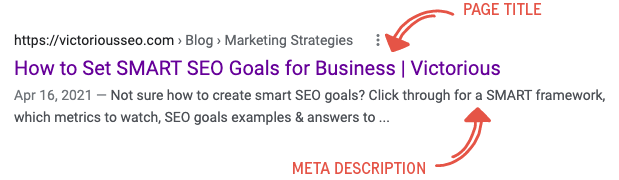
Title tags tell search engines and searchers what your page is about. A well-crafted page title includes a primary or secondary keyword, is no longer than 60 characters (otherwise, Google will cut it off in SERPs), and will entice searchers to click through to read your content.
3. Meta Description
The meta description appears under your page title in search results. Much like the page title, the meta description serves a dual purpose. A good meta description tells both the reader and Google what your page is about and offers a compelling reason for searchers to click through to learn more. Use secondary keywords in your meta description and make sure it’s 110 – 140 characters long.
4. Introduce Your Topic
Your intro should be about 100 words long and include your primary keyword. Use your introduction to state the problem your audience is experiencing. (What prompted the search that led them to you?) Next, include the benefits you listed in your objective, clearly stating what the reader will learn if they read on. Tell them how learning these things will help them solve the problem you identified at the beginning of your introduction, and encourage them to keep reading for solutions.
5. Outline the Body of Your Article
Start with at least three ideas that support your main topic. The beauty of creating a bulleted list of your main points is that you’ll start to see patterns develop in these supporting ideas that you can further templatize for specific types of content.
Here’s what I mean.
When I outlined “A Guide to Google Search Console,” the main points were:
- What is Google Search Console?
- Why Do You Need Google Search Console?
- Who Should Use Search Console?
- How to Set Up Google Search Console
- The Basic Features of the Google Search Console
You can easily apply this type of outline to other how-to guides:
- What is the thing?
- Why do you need to use the thing?
- Who should use the thing?
- How do you use the thing?
- Ten ways to start using the thing right now
Or my favorite:
- 10 FAQs people ask about the thing
These main points become the primary subheadings in your post. They make it easy for readers to skim down the page and see what you’re going to teach them. It also makes it easier to “chunk” your content so AI platforms can more easily “read” and cite your content, too.
When you’re filling in your outline, remember to format your writing into short paragraphs with a simple sentence structure. (There are specific guidelines for sentence and paragraph length in the blog article template.) Use bullet points to keep your piece skimmable.
Pro tip:
“How-to” guides like the one outlined above are a great example of evergreen content. This type of content is constantly in demand and stays fresh while it works its way up Google’s search results.
6. Wrap It All Up With a Conclusion and Add a Summary
Summarize your post in about 60 words by reiterating your main points, and finish with your CTA.
Then, once you have everything laid out, create a bulleted summary at the top of your post with what you’re going to cover.